QA Hunt Get the app
For QA, testing & SDET careers in India

QA jobs, ranked for you. Not just the newest.

QA Hunt puts the jobs that fit your skills first, shows how well each one matches your profile and resume, and shows each application's status as the hiring team updates it.

Get it on Google Play iPhone app Coming soon

Free for candidates Android 11+ Sign in with WhatsApp OTP or Google

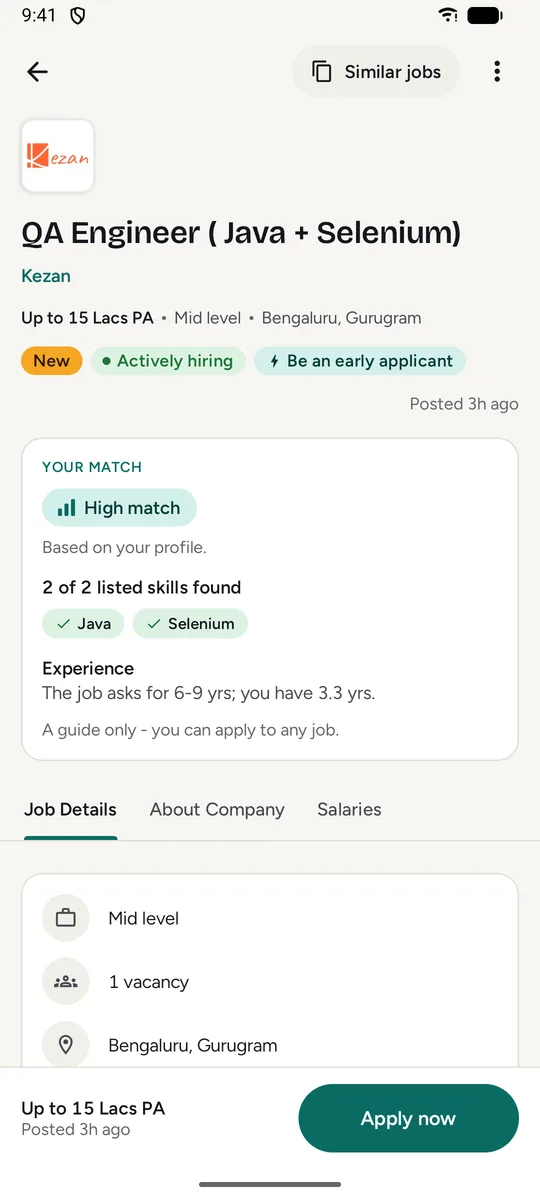
A job page in QA Hunt with a Your match card: High match, 2 of 2 listed skills found, Java and Selenium.
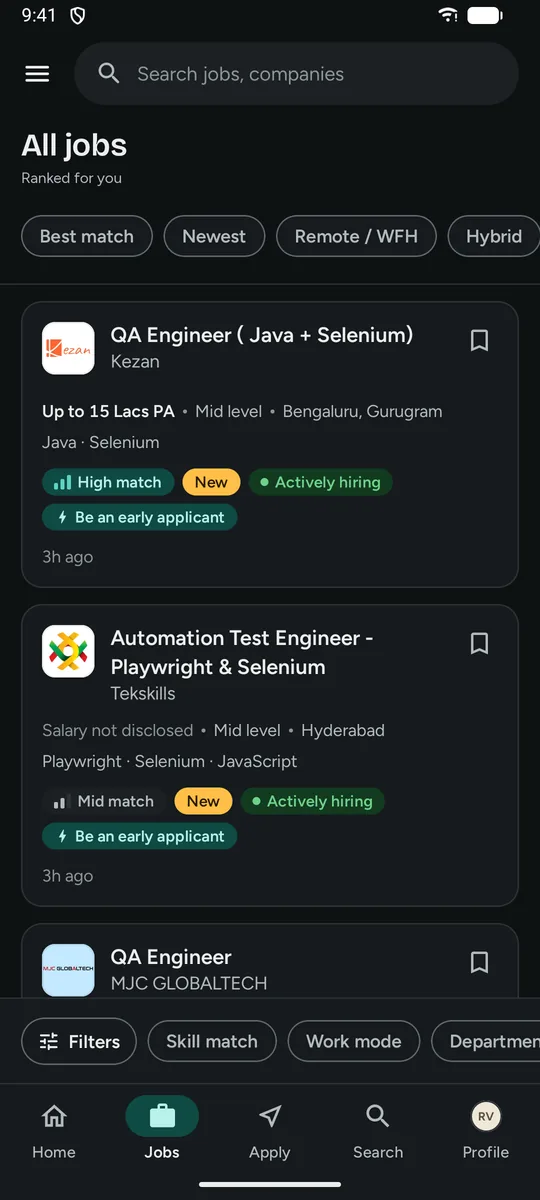
The QA Hunt Jobs tab, ranked for you: job cards with salary, experience, location, skills and badges such as High match, New and Actively hiring.
  • Ranked for youYour skills, role, city and experience decide the order.
  • Match on every jobHigh, Mid or Low, from your profile and resume together.
  • Every step visibleApplied, Viewed, In review and Shortlisted.
  • AI first roundsVoice screening interviews when a recruiter invites you.
What's inside

Less scrolling. More of the right jobs.

Everything in QA Hunt is built around one question: which testing jobs are worth your time today?

For you

A job list that is ranked for you.

QA Hunt orders the jobs for each candidate. Switch between For you and Newest any time.

  • Fit comes first: your match, skills, preferred role, city and experience.
  • Fresh, not pushy: new jobs get a small lift that fades over days.
  • A fair chance: crowded jobs step back a little and jobs with few applicants step forward.
  • Newest is one tap away, and it still shows your High matches first.
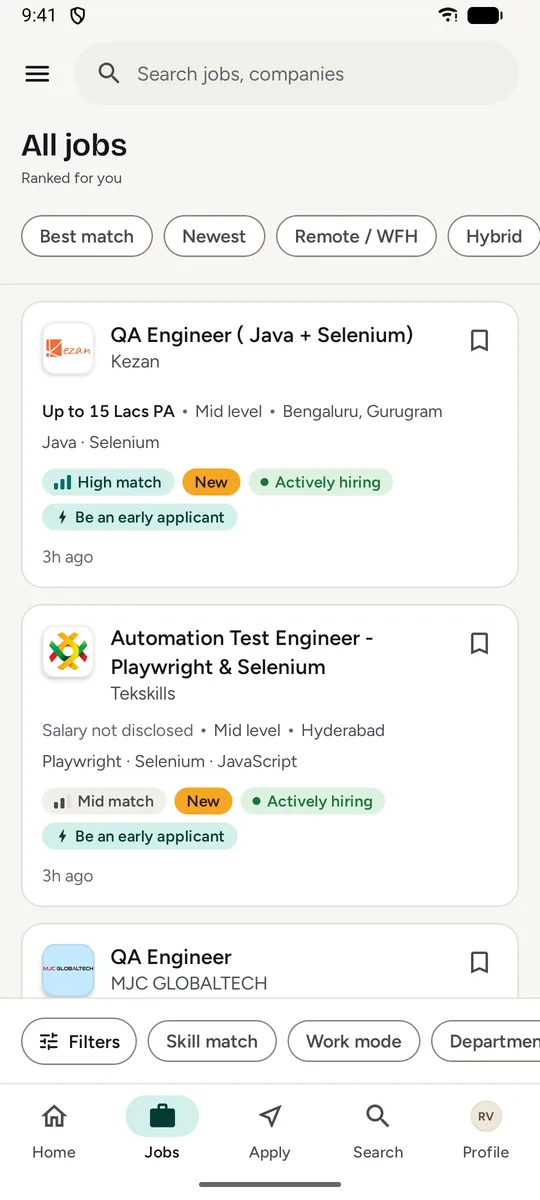
The Jobs tab, ranked for you: each card showing pay or Salary not disclosed, experience, location, skills, a match badge and how long ago it was posted.
Jobs tab · ranked for you, 20 at a time
Your match

Know your match before you apply.

QA Hunt reads the job description against your profile and your resume together, and shows the result as a word, never a score you have to decode.

High match Mid match Low match
  • See why: which listed skills you have and how your experience compares.
  • On every card, in the job page and on the jobs you applied to.
  • Updated when you are: upload a new resume and your matches are worked out again.

Matching starts when your profile is at least 90% complete and a resume is uploaded. It is a guide only: you can apply to any job.

A QA Engineer job page with a Your match card: High match, 2 of 2 listed skills found (Java, Selenium) and an experience note.
Job page · Your match card
Skill match filter

Show only the jobs that fit.

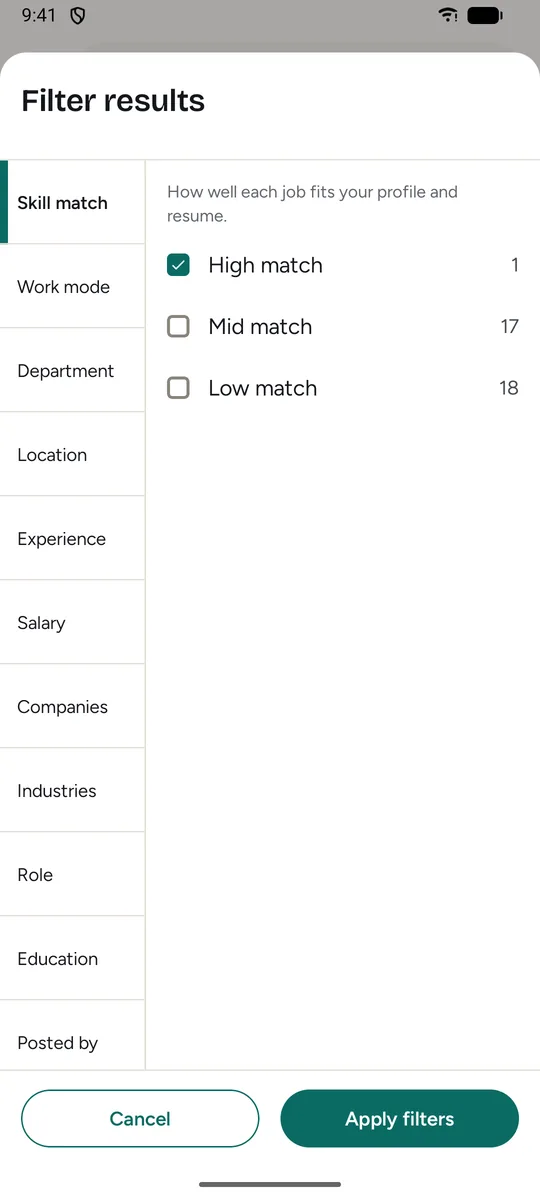
Pick High, Mid or Low match, in any combination, next to the usual filters. The number beside each option counts the matching jobs in your current list.

  • High matches lead in the default order, in Newest and in search results.
  • Combine it with work mode, location, experience, salary, company and more.
  • Best match chip for a one-tap shortlist of High and Mid jobs.
The filter sheet open on Skill match with High match selected and a job count next to High, Mid and Low match.
Filters · Skill match
Your applies

Follow every application, step by step.

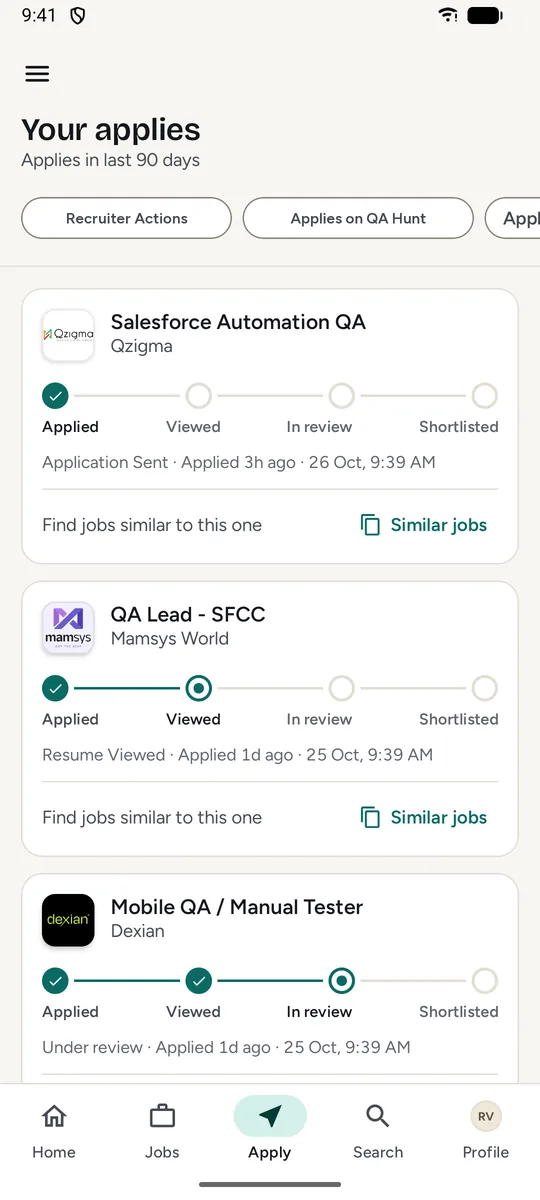
See where each application stands: Applied, Viewed, In review or Shortlisted, as the hiring team updates it, next to the date and time you applied.

AppliedViewedIn reviewShortlisted
  • Recruiter actions collected in one place.
  • Similar jobs from any application, so a good lead never ends with one apply.
  • Saved jobs stay ready for later.
The Apply tab, Your applies: each application with an Applied, Viewed, In review, Shortlisted progress line and its date.
Apply tab · Your applies
AI screening interviews

Shortlisted? Take your first round by voice.

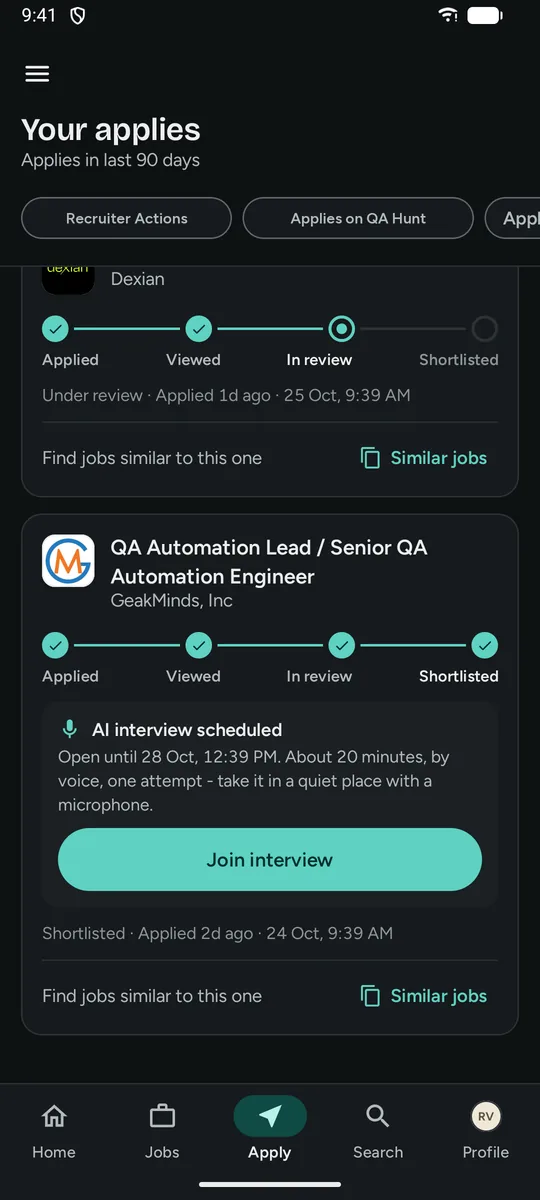
Recruiters can invite shortlisted applicants to a short first-round interview with an AI interviewer. The invite appears right on your application.

  • Your time, within the window: join from the Apply tab before the invite closes.
  • Consent first: you see what is recorded and agree before it starts.
  • One attempt, in your browser, with a microphone and a quiet place.

The interview result is decision support for the recruiter. People make the hiring decisions, and the interview never changes your application status by itself.

A shortlisted application in dark mode with an AI interview scheduled card: open until a date, about 20 minutes, by voice, one attempt, and a Join interview button.
Apply tab in dark mode · AI interview invite
Profile & resume

One verified profile. Apply in a tap.

Build your profile once: headline, skills, IT skills, experience, projects, education, certifications and career preferences. Upload your resume and you are ready.

  • Resume as PDF, DOC or DOCX up to 5 MB, viewable any time.
  • Apply-ready at 90%: a "Before you apply" checklist shows exactly what is missing.
  • Verified e-mail and mobile, so recruiters reach the real you.
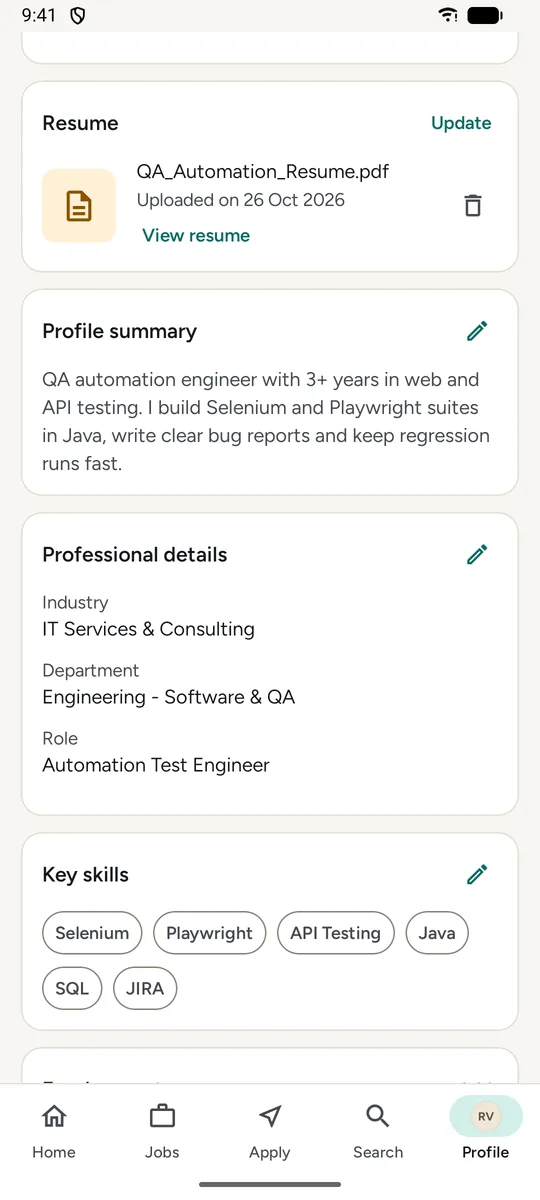
The Profile tab: an uploaded resume with a View resume link, the profile summary, professional details and key skills.
Profile · resume, summary and skills
And the details

Small things that make the search calmer.

  • Company pages

    A company's profile, logo and every open role in one place, wherever the company has shared them.

  • Block a company

    Hide a company's jobs everywhere in the app, for example your current employer.

  • Light, dark or system

    Choose the look of QA Hunt in the app itself. Your phone's settings stay as they are.

  • Honest badges

    New, Actively hiring and Be an early applicant come from real posting dates and applications.

  • Pull to refresh

    Swipe down on any screen for the latest jobs, applications and matches.

  • Stays signed in

    No routine log-outs, not even after app updates. You stay signed in until you sign out or your session can no longer be confirmed.

Only testing jobs

Every QA role, nothing else.

QA Hunt lists software testing and quality jobs only, so your feed is never padded with roles you would not apply to. Jobs stay live for 15 days, then leave the list.

Roles

  • Quality Analyst
  • Manual Testing
  • Automation Testing
  • SDET
  • Performance Testing
  • Software Development Engineer
  • Internships

Work modes

  • Remote
  • Work from home
  • Hybrid
  • Work from office

Filters

  • Skill matchHigh · Mid · Low
  • Work modeRemote to on-site
  • DepartmentEngineering - Software & QA
  • LocationCities and Remote
  • ExperienceFreshers to 10+ years
  • SalaryLakhs per year
  • CompaniesWho is hiring
  • IndustriesWhere you fit
  • RoleQA to SDET
  • EducationWhat is asked
  • Posted byCompany or consultant
How it works

Three steps to your next QA role.

  1. Sign in and verify

    Use a WhatsApp code or Google, then confirm your e-mail and mobile number.

  2. Complete your profile

    Add your skills, experience and resume. At 90% you are apply-ready and your matches appear.

  3. Apply and follow up

    Apply to the jobs that fit, track each step and join an AI first round if a recruiter invites you.

Your data, explained

Built for candidates, with clear controls.

  • Verified accountsEvery candidate verifies an e-mail address and a mobile number.

  • Recruiters see applicants onlyHiring teams work in a separate web panel and only see the people who applied to their own jobs.

  • No ads, everThe app talks to QA Hunt, plus Google for sign-in and for usage and crash statistics without your name, e-mail or number, which you can switch off in Settings.

  • We never ask for moneyQA Hunt does not promise a job or an interview for a fee. Anyone asking for one is not us.

FAQ

Good questions.

Still unsure? Write to info@grafo.in.

Is QA Hunt free?

Yes. QA Hunt is free for candidates. There are no paid plans or in-app purchases.

Where can I get the app?

QA Hunt for Android is on Google Play. The iPhone app is coming soon. We never send app files or download links by WhatsApp or e-mail.

How does the match work?

QA Hunt compares each job description with your profile and your resume together and shows High, Mid or Low match on the job. Matching starts once your profile is at least 90% complete and a resume is uploaded. It is a guide only: you can apply to any job.

What is an AI screening interview?

When a recruiter shortlists you, they can invite you to a first-round voice interview with an AI interviewer. You open it from the Apply tab, agree to the consent and answer in your browser in one attempt. The recruiter sees the result as decision support; people make the hiring decisions.

How can I sign in?

Use a one-time code on WhatsApp or your Google account. Your e-mail address and mobile number are both verified before candidate features open.

Which Android version do I need?

Android 11 or later.

How do I delete my account?

Follow the steps on the Account deletion page.

Get QA Hunt

Your next QA role, ranked first.

Install QA Hunt from Google Play. It is free, and setting up your profile takes a few minutes.

Get it on Google Play iPhone app Coming soon
The QA Hunt Jobs tab in dark mode with ranked job cards and match badges.